
Установить приложение
Как установить приложение на iOS
Следуйте инструкциям в видео ниже, чтобы узнать, как установить наш сайт как веб-приложение на главный экран вашего устройства.
Примечание: Эта функция может быть недоступна в некоторых браузерах.
Вы используете устаревший браузер. Этот и другие сайты могут отображаться в нем неправильно.
Необходимо обновить браузер или попробовать использовать другой.
Необходимо обновить браузер или попробовать использовать другой.
Модуль Universal Import/Export Pro
- Автор темы CAPAXA
- Дата начала

Подскажите плыз спарсеные датаколом атребуты идут в таком вот формате Основні >Зв'язок >Екран >Процесор >Пам'ять >Камера >Операційна система >Бездротові технології >Інтерфейси >Корпус >Акумулятор >Габарити та комплектація >Гарантія и так далее в 3х столбцах группа атр название атр и значение атр но какие бы разделители не ставил - все распознаеться как одна строка! Как заставить распознавать коректно разделение атребутов? Может быть есть какой то разделитель?
Последнее редактирование:
Посмотри в сторону xpath запросов делал нимиПодскажите плыз спарсеные датаколом атребуты идут в таком вот формате Основні >Зв'язок >Екран >Процесор >Пам'ять >Камера >Операційна система >Бездротові технології >Інтерфейси >Корпус >Акумулятор >Габарити та комплектація >Гарантія и так далее в 3х столбцах группа атр название атр и значение атр но какие бы разделители не ставил - все распознаеться как одна строка! Как заставить распознавать коректно разделение атребутов? Может быть есть какой то разделитель?
Выгрузка с ексель файла ... не нахожу там xpath настройкиПосмотри в сторону xpath запросов делал ними

Там все просто | разделитель там при импорте можно в принципе выбирать, что воспринимать как разделитель, в статике указываешь %NL% чтобы каждый атрибут начинался с новой строкиПодскажите плыз спарсеные датаколом атребуты идут в таком вот формате Основні >Зв'язок >Екран >Процесор >Пам'ять >Камера >Операційна система >Бездротові технології >Інтерфейси >Корпус >Акумулятор >Габарити та комплектація >Гарантія и так далее в 3х столбцах группа атр название атр и значение атр но какие бы разделители не ставил - все распознаеться как одна строка! Как заставить распознавать коректно разделение атребутов? Может быть есть какой то разделитель?
Группа атрибута|название|значение
Группа атрибута|название|значение
Группа атрибута|название|значение
Импортируется потом без проблем
Поделитесь, пожалуйста, фиксом? Столкнулся с такой же проблемой, функция "Ограничить импорт" не работает. Не обращает внимание на стартовую строку и всегда начинает с первой. При импорте из большого файла, например, надо взять с 9000 по 9500 позицию, после импорта каждой строки перебирает весь массив и тупит страшно.Получилось скриптом удалять строки, потом скрипт модуля отрабатывает, все по крону) По примеру сделал так же как на вашем скрине, только выбрал не умножение, а сразу процент, а для чего у вас умножение?
Как решить проблему с no_index и meta_h1:Люди, подскажите, а кто как лечил при импорте проблему с meta_h1?
This error is generally because you have some custom module that tries to insert some data into the database Try to set in Step 3 > Extra functions > Custom fields a custom field named "meta_h1" в 44 строке: $this->db->query("INSERT INTO " . DB_PREFIX . "information_description SET " . $univimp_extra_desc . " information_id = '" . (int)$information_id . "', language_id = '" . (int)$language_id . "', title = '" . $this->db->escape($value['title']) . "', description = '" . $this->db->escape($value['description']) . "', meta_title = '" . $this->db->escape($value['meta_title']) . "', meta_h1 = '" . $this->db->escape($value['meta_h1']) . "', meta_description = '" . $this->db->escape($value['meta_description']) . "', meta_keyword = '" . $this->db->escape($value['meta_keyword']) . "'");
Поле no_index отвечает за включение/отключение индексации страницы, импортированные данные могут иметь вид только 0 или 1, если у вас в файле импорта есть какой-то столбец с нужной нумерацией, например "статус", то можно использовать его.
Поле meta_h1 - дополнительное поле заголовка, тут можно импортировать колонку заголовка
Создаются поля перед импортом на шаге 3, Дополнительные функции - Пользовательские поля.
Для поля meta_h1 нужно создать "Пользовательское поле описания"
Пример на скриншоте
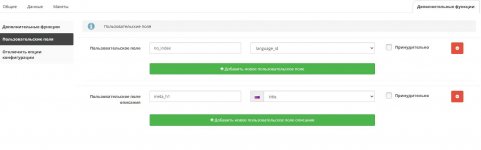
Модуль настраивал на OpenCart 3.0.3.8 Club Edition v1.4, PHP 7.3

Сравни с инглишом, синтаксис кривой после автоперевода в рус.при русификации появляются не все переведенные кнопки, вместо некоторых-HTMLтеги. почему так? кто-то знает? иначе удобней на английском, а то 50/50 как-то не совсем удобно
После установки на 3 шаге слетает верстка, исправленые строки кодаПеревод для версии 3.7.1
-=Ограниченное содержимое=-

В модуле используется поле oc_product.import_batch, для разделения импортов
Но это поле по умолчанию нельзя использовать для функции "skip on existing value" на третьем шаге. Что было бы удобно, чтобы, например, товары разных импортов с одинаковыми model не смешивались
Его можно добавить:
upload\admin\view\template\module\ universal_import_functions.tpl , 810 строка:
Добавить ,'import_batch' :
Но это поле по умолчанию нельзя использовать для функции "skip on existing value" на третьем шаге. Что было бы удобно, чтобы, например, товары разных импортов с одинаковыми model не смешивались
Его можно добавить:
upload\admin\view\template\module\ universal_import_functions.tpl , 810 строка:
Код:
   if (in_array($profile['import_type'], array('product', 'product_update'))) {
 $dbFieldsTypes = array('name', 'description', 'model', 'sku', 'upc', 'ean', 'jan', 'isbn', 'mpn', 'location', 'quantity', 'subtract', 'price', 'status', 'manufacturer_id', 'date_added', 'date_modified');
 } else if (in_array($profile['import_type'], array('order', 'order_status_update'))) {
          $dbFieldsTypes = array('total', 'payment_code', 'shipping_code', 'order_status_id');
        }
Добавить ,'import_batch' :
Код:
   if (in_array($profile['import_type'], array('product', 'product_update'))) {
 $dbFieldsTypes = array('name', 'description', 'model', 'sku', 'upc', 'ean', 'jan', 'isbn', 'mpn', 'location', 'quantity', 'subtract', 'price', 'status', 'manufacturer_id', 'date_added', 'date_modified','import_batch');
 } else if (in_array($profile['import_type'], array('order', 'order_status_update'))) {
          $dbFieldsTypes = array('total', 'payment_code', 'shipping_code', 'order_status_id');
        }
Universal Import/Export Pro v5.8.0
Там в папке есть нулл и не нул, по названию понятно, тольком не тестировал, будут ошибки, пишите, поправим.
За симпы:
За балы:
Там в папке есть нулл и не нул, по названию понятно, тольком не тестировал, будут ошибки, пишите, поправим.
За симпы:
Скрытое содержимое. Вам нужно войти или зарегистрироваться.
За балы:
Код:
v4.5.4
- Correct links to items in OC4

v4.5.3
- Fix import by category id

v4.5.2
- Improved compatibility with custom modules

v4.5.1
- Fix rootCat error
- Fix customer export duplicate values

v4.5.0
- Import discount even with 0 quantity
- Fix current DB import type in cron

v4.4.9
- Fix issue on array_flip()

v4.4.8
- Fix arry_key_first() issue on PHP < 7.3

v4.4.7
- Fix XLSX import with PHP8.0 OC4

v4.4.6
- Discount import based on array
- Fix errors on order export
- Fix error with xml mode

v4.4.5
- Fix issue to download images on some servers with error http code 0

v4.4.4
- Fix order export on OC 2.1

v4.4.3
- Fix option_value_id updated in "Update first then add option"

v4.4.2
- Possibility to use json path in multiple fields

v4.4.1
- Make attributes to be trimmed to avoid unwanted duplicated
- Make options to be trimmed to avoid unwanted duplicated

v4.4.0
- Fix substore export image link

v4.3.9
- Improved API handling

v4.2.9
- Better handling of images without extension

v4.2.8
- Fix url in export of substore

v4.2.7
- Added possibility to skip on existing value category

v4.2.6
- Compatibility with Custom In Stock Status

v4.2.5
- Possibility to use tags to customize path for downloaded images
- Trigger warning when tax class name or ID is not found

v4.2.4
- Fix call to function clear() on null

v4.2.3
- Fix cron error in combination with RocketBoost appearing on some servers
- Fix automatic conversion of false to array is deprecated

v4.2.2
- Fix issue to load file in cron mode appearing sometimes
- Add export product layout

v4.2.1
- Export now export also disabled languages

v4.2.0
- New option to choose to preserve filters or not

v4.1.9
- JSON handle up to 6 levels original data field

v4.1.8
- Possibility to use {sprintf:format:value} tag
- Fix error appearing sometimes running cron with RocketBoost enabled

v4.1.7
- Fix only first default value applied

v4.1.6
- Fix undefined array key "customer_group_id"
- Possibility to use tags function into product quick update mode

v4.1.5
- Fix remove item if not skipped not working with skip from category binding skip empty mode

v4.1.4
- Possibility to insert special value [date:format]

v4.1.3
- Fix get compressed file by FTP

v4.1.2
- Order export field product_id instead of product_product_id

v4.1.1
- Fix error when using update replace made with product id as identifier

v4.1.0
- Possibility to get image name based on various parameters in the url
- Fixed skip function not detecting correct value on some servers
- Improved order export/import
- Fix conditional table greater/lower than
- Improved option import of combined options

v4.0.0
- Compatibility with PHP 8.1
- Compatibility with OC 4.x
- Improved option import
- New option to include option based on quantity
- New option to choose cache delay
- Options in actual cart are not resetted in case of using Update > Preserve and Option replace mode
- Fix multiple downloads of public downloads
- Improved count of XLSX total rows
- Fix ftp connexion with ? in password
- auto create category seo url does not create duplicate keyword

v3.9.7
- New options to disable auto create of seo urls

v3.9.6
- Compatibility with Joocart
- Handle option extra field import in product quick update (custom fields)
- New setting in option import to update only current option
- Fix seo field binding not appearing on OC 3.x

v3.9.5
- Fix order export of shipping_value

v3.9.4
- Possibility to export only filter groups
- No default start and end date for special price
- added {year_short} and {month_short} tags

v3.9.3
- Improved load performance in case of lot of categories
- Delete items if file is not empty also working in case the file have headers
- Profile display only selected advanced options
- Compatibility with Image External URL
- Preserve categories also working with category binding
- Improved API import
- Possibility to auto detect filename inside zip
- New option for cron log to log only summary
- New option to limit number of images to import
- Improved attribute import
- Filter in preserve mode is not resetted

v3.9.2
- Improved category binding with complex category import
- Fix attribute import with '&' inside caused to duplicate it
- Fix reset() issue

v3.9.1
- Improved JSON import
- Fix UTF-8 issue with attributes in html

v3.9.0
- Option params sometimes not working
- Fix XLSX import on PHP 8
- Improved json decode function
- Insert first then add option mode now can also insert new images to product with mode "Add"
- Exclude mode for filter model in product export
- Improved compatibility for extra option array detection
- Improved API
- Possibility to select specific export of reward points
- Improved image extension detection on some CDN
- Possibility to set category seo url for one language only
- Fix customer import salt field appearing on wrong option
- Fix attribute with same name but different group was saving only one
- Fix attribute combining sometimes showing empty values
- Possibility to skip on existing value "special price"
- Export in xml was sometimes generating invalid xml file with special chars in some values
- Possibility to extra zip file with custom filename inside
- Improved category binding

v3.8.6
- Fix manual upload files issue on some servers

v3.8.5
- Added possibility to import seo redirection when Complete SEO is installed
- Fix FTP not working in cron mode on PHP 7
- Category binding on some json not working
- New function to encode/decode JSON

v3.8.4
- Export field additional image was not returning empty
- Handles incorrect defined category parent that was causing infinite loop on export
- Fix xml multiple data get sometimes getting only one value
- Deduplicate images in case of repetitions
- New setting to generate attributes based on options

v3.8.3
- Support more FTP
- XML order export now export products in dedicated node
- Delete if file is not empty function was not working in cron mode

v3.8.2
- Fix skip on import value not working with xml path
- Fix undefined index appearing on some xml
- Possibility to skip on existing value based on import label
- Fix extra field not saved correctly in profile for advanced option fields
- Export descriptions in xls and xlsx in raw html
- Improved attribute import in xml mode
- Do not delete existing option when using Update mode
- More options available in Step 2 > Delete
- Improved image download in some cases

v3.8.1
- New option to disable field on update preserve only if it is empty
- Possibility to set images automatically from an existing folder
- Set default cron key when installing module
- Do not try to get subdata in xml mode in case of too much subnodes
- Fix attribute export
- Fix update preserve mode for seo keywords

v3.8.0
- Big performance improvement on ODS/XLSX
- XLSX support for strict OOXML
- Compatibility with PHP 8.0
- Improved API
- Option multiple separator now also handles other fields than value

v3.7.2
- Better attribute handling in case of colons
- New option to exclude export category
- Fix auto_next_page not working in cron jobs
- New tag microtime in API
- Filter export by EAN
- Handle auto create filters when with colon char
- New option to abort delete in case of empty file

v3.7.1
- Possibility to handle XML request in API mode
- Fix export substore combined with Complete SEO multistore seo disabled was not exporting url
- Improved wholesale price table function to work with custom category path
- Fix some deprecated notices
- Possibility to set Public Download display name with "Display name:FILE_URL"

v3.7.0
- New feature: disable field on update preserve
- Posibility to set field manually in extra function for JSON
- Fix delete function not working fine in cron
- Fix issues in product attribute import mode

v3.6.5
- Improved XPath query result
- Possibility to set custom name for XPath query
- Improved attribute import
- Improved SFTP support

v3.6.4
- Review import: detect customer by email
- Improved import of recurring profiles
- Improved inline documentation
- Improved filter import in category mode
- Fix undefined index row_status in attribute import

v3.6.3
- Fix logout during import on some servers
- Improved category import in case of importing multiple categories + multiple subcategories
- Fix XML files with namespace in main node was getting only first item
- Fix advanced attribute configuration not saved
- Fix saving custom data in extra function field was duplicated for modifier value

v3.6.2
- Improved option import to handle specific xml formats
- Import options by string format also can take column header name
- Fix sql collate error appearing with some specific db encoding
- Deduplicate image in CSV when choosing same field
- Possibility to use multiple params for image name
- Handle correctly option price in full price mode
- Handle option prices with comma
- Fix cron import fails in case of incorrect XML

v3.6.1
- Compatibility .xls import with php 7.4
- Possibility to set various models to filter for export
- Fix delete condition not working properly
- Possibility to export backup with conditions
- Fix truncate in export backup
- Fix restore backup stopping on empty line
- Fix options mixed in update preserve mode
- Option to select XML processor engine
- Comptibility with Public Downloads

v3.6.0
- Possibility to save extra function result into existing import file fields
- Detect if export field is too long for excel field (32k)
- New filter to select max quantity in product export
- Possibility to choose export folder
- New option to choose some condition for step 2 > delete
- Choose fields to export for customer
- Compat with latest sql version
- Default values for attribute import applies to all values in case of multiples
- New option to skip current item if image is not found
- Added customer IP field for import
- Added user agent, ip, accept language fields in order import/export
- Improved conditionnal values to apply on array
- Fix image save issue when incorrect charset in filename from xlsx file
- Fix undefined children in some xmls

v3.5.0
- New option to remove part of image path
- Get specific data with * wildcard in xml and json mode
- Fix temp files not cleaned with some xlsx files
- Detect more languages for field with yes/no value
- Handle multiple attribute import
- Better API import
- Possibility to use conditional values on arrays
- Fix google spreadsheet not working in some cases in cron mode
- Export link correspond to correct language
- Delete old temp files from cache folder on cron jobs too
- Possibility to export images in separate fields
- Extra fields not correclty saved in some extra functions
- Show stock status text in export
- Possibility to set default values for attributes which are usually taking node/column name
- Detect attribute column name in format of product_attribute:[attribute_group]:[attribute]
- Reset special price in preserve mode in case it is same as normal price
- Fix xml export incorrect when there is cdata tag in values
- Fix php warning Deprecated: Unparenthesized `a ? b : c ? d : e`
- Fix some settings not correctly saved in extra functions in some specific cases
- Detect XML file format errors
- Set default value not available on some fields in data tab

v3.4.1
- New option to convert excel timestamp to dates
- Fix download from google spreadcheet not working with some urls
- Fix excel boolean cell not correctly detected
- Fix delete non updated manufacturers was also deleting just inserted ones
- Fix error on manufacturer export with relative image url
- New option in category import to set children categories
- Possibility to import subcategories by ID
- New option to import images on separate rows
- Possibility to import filters into categories

v3.4.0
- Export of product_special also export separate fields
- Handle not found profile on some specific hosts
- Language filter for attribute export
- Added more contextual help
- Fix error on export with mega filter
- Fix customer cannot login when importing with clear password on OC 3.x
- Added support for JSON export
- Fix products not displayed on front when the status field was a numeric value higher than 0

v3.3.2
- Improved xml path finding
- De-duplicate first additional image in case it is same than main image and using image array

v3.3.1
- Fix complex custom fields value showing array() instead of value
- Fix export was not exporting product with qty below 0
- Fix Update preserve mode was not resetting options in case of empty option field
- Fix export product attributes was not exporting all attributes
- New options to choose specific import format for discount and special price
- Fix old options not deleted when using mode 'update first then add option'

v3.3.0
- Reviews import/export
- Possibility to change the import label in product edition
- More details for special price export
- Fixed issues "htmlspecialchars(): charset UTF-8 not supported" on some servers
- Added parameter in step 2 to choose the data field for JSON files
- Possibility to import filters by ID
- Moved Import label into step 4

v3.2.3
- Choose out of stock status in product quick update
- Possibility to update only one language in attribute import
- Better handling of CSV option import
- Possibility to set category code to import by specific identifier
- Better related product detection
- Compatibility of update preserve mode with mega filter
- Better compatibility with google spreadsheet files
- Fix empty rows when using xml with namespaces
- Do not update special price if it is equal to 0
- New possibilities to import attributes in CSV/XLS mode
- If xml node is not found put > before the node name to try other detection method

v3.2.2
- Possibility to import customer in update preserve mode
- Possibility to combine various fields in advanced option import
- Fix mix of default address
- If no default address the 1st one is assigned as default
- Fix XLS export of big number (+15 digits) were getting scientific notation as default in excel, now will be normal number

v3.2.1
- Attribute advanced mode now also works for json
- Possibility to handle more possibilities for file download
- Customer import now display exact number of necessary addresses to import

v3.2.0
- Possibility to set category code, allow to work with feeds which only has category code instead of name
- Improved API import
- Fix undefined index $k in quick update mode
- Do not insert first additional image in case of same than main image was not working when using a field separator
- Handle images links with // instead of https://

v3.1.1
- Fix issue double name value when Complete SEO multistore mode was enabled
- Added possibility to set the product option value id in order to keep same id on option import/update
- Fix xml path typed manually in extra functions were not saved correctly in profile
- Handle multiple options values and multiple quantity by separator in Product Quick Update
- API import can handle more possibilities
- Profiles list is now sorted alphabetically
- Automatically get correct download link when using a google drive or google docs link
- Support download of webp images
- Set default values also works with array values
- Detects image filename inside headers in case it is not elsewhere

v3.1.0
- Option to export manufacturer images as URL like for products
- More flexible API
- Possibility to set {year} {month} {day} tag in import url or ftp url

v3.0.3
- Fix error with some specific XML file

v3.0.2
- Export also the sku in Per product export mode
- Possibility to handle more fields in Skip on existing value function
- Fix undefined index with some specific XML formats
- Better handling of customer custom fields import

v3.0.1
- Possibility to match multiple items in product quick update

v3.0.0
- Fix attributes not exported in csv when no selecting language
- Advanced discount import is now in product quick update too
- Possibility to handle values separated by multiple separator as option value in quick update
- Fixed undefined option_format
- Correctly import images with url encoded path
- Improved special price import
- Possibility to choose the file encoding on xml files
- Import all extra fields of category/information/manufacturer import with Complete SEO multistore setup
- Import attributes from <table> now strips extra spaces/tabs
- Do not import empty attribute/filters
- Better layout override import
- Added update preserve mode for attribute import
- New option in extra function skip: is not equal to list
- Add more possible operation in extra function Wholesale price calculator
- Fix field replace not saving correctly manual value
- Fix some remote images not found in case they contains encoded chars
- New extra function to insert specific values [unique_id] [current_row]
- Image downloader can now also download images from ftp url (ftp://usr:pwd@ftp.example.com)
- Fix some default values not saved in profile
- Fix custom field nodes in order export XML
- Fix CSV product export not exporting options in single row mode
- Import label when using cron now can use the name saved in profile
- Fix session lost during big process caused by too much data in session
- Possibility to use {date:d-m-Y} in import url (works with php date format)
- Fix error using some specific delete settings
- Function replace can now also replace by field value
- Fix cron not workign when saving profile name with accentuated chars
- Fix remote image returns 404 although correct url on some remote servers
- New option to only insert new categories
- Round total in order update > skip on existing value
- Give more information on skip on existing value function
- Fix undefined categor_insert_type when using update replace mode
- Possibility to select which data to export for orders
- Fixed "update first then add option" mode not working properly
- Fix 403 error on some urls
- Regex functions now work in multiline mode
- New import mode by API
- JSON type new extracts data from array subnodes
- Fix Set default value param not saved correctly in profile
- Fixed skip on existing value not working
- Fixed attribute name import
- Option import correctly detects option name in case of special chars in name
- Possibility to use line breaks as custom multiple separator with [\n]
- New option for attributes to get correct data in case of colon in value
- Fix category preserve mode reseting parent category
- Possibility to change table prefix in Backup mode
- XLS import compatible with PHP 7.3
- Fix existing item mode: update first then add option not correctly detecting option when matching batch number
- New parameter to set a multiple value separator for option value
- Profiles for export
- Category filter in export now includes also the subcategories
- Filter export by tag
- Status string not correctly detecting in category import
- Possibility to import Canonical path for Complete SEO Package
- Improved attributes array detection
- Improved option relative path detection
- Fixed category exclusing binding was only taking 1 category
- Attribute import detect incorrect database values and fix them
- Improved XLSX performance
- Filters can be imported separated by multiple separator
- Fixed selected export fields in export profile were not in correct order

v2.9.6
- New function: generate random number
- New function: count chars from string or items in array
- Conditional values function can now handle AND parameter
- Fix undefined index on category with some specific settings from binding
- New option in quick update mode for having multiple special prices
- Fix Option string format saved in wrong order in profile
- Improved option import
- Fixed + operator in option import
- Duplicate options are now added in quantity
- Fix warning message in preview not displayed in correct tab if csv header enabled
- Related product can detect multiple values

v2.9.5
- Navigate through simulation preview
- Apply default value parameter for update preserve mode
- Get more parameters in xml mode
- Fix import label not updated when updating product
- Improved image download time, which leads to better performance of import time
- Option import can now differenciate values with accented chars
- Order export now export custom fields non-encoded

v2.9.4
- Handle remote images with complex utf-8 names
- Get last rows of import file now also works with delete parameter
- Get last rows does not go below the minimal number of items in feed
- Fix attributes importing only last available one
- Attributes can now be imported based on html table
- Options with direct value can take the header name as option name
- Possibility to export data of all stores
- Fix extra functions skip, and remove item not working when comparated to other field
- New option to handle specific option string format
- Fix issue when creating an extra field with same name than a default opencart field

v2.9.3
- Improved product quick update to handle better option update
- Fixed import mode update then add option
- Category parent can now handle ID
- Identifier by category name not working in some cases
- Display error message if not correct file encoding selected
- New option to select a list of values when using skip or remove extra function
- Better handling of 3rd party modules custom fields
- Attribute import can now handle array of values
- Fix store default setting not working correctly since last update

v2.9.2
- Possibility to set folder of image path for non-download path
- Fix multiple value separator not available in xls xlsx settings
- Better compatibility with 3rd party seo moodules
- Store import parameter can now be set with multiple fields
- Improved conditional values extra function
- Improved filter handler to get column header in case of multiples values in one column
- If mb_string extension is not loaded the module can still be working
- Improved XML discount export
- Improved XML import profile
- Simulation displays more information in case of errors

v2.9.1
- Improved date converter function to handle more formats
- Cron command displayed in admin was wrong in case you use space in profile
- New option insert mode 'update' to keep current values and ids
- Possibility to export option sku
- Fix parent category not correctly detected when multiple categories with same name in category import
- Fix multiple attributes not correctly detected
- Export by option not working when selecting specific fields to export
- Improved discount import/export
- Import by manufacturer ID
- Improved attribute import

v2.9.0
- JSON import is now available
- TXT and TSV export
- Possibility to set separator for CSV export
- Better handling of getting image name from CDN
- Product export now export also related products
- Export current special price
- XML now puts cdata only when necessary
- Possibility to select what is the CSV enclosure character

v2.8.5
- Handle custom xml path into extra fields selector
- Fix cron job not importing items if delete items before import was enabled
- Better compatibility with 3rd party SEO extensions
- Add seo keyword in category export
- The disable or set qty to zero was not logged from recent update
- Extra function Replace and Remove now works also on array of values

v2.8.4
- Tax class is now detected by name, ID, or rate
- Add category link in export
- Fix selected encoding not working from recent update
- Added all option types for specific field export
- Fix: explode() expects parameter 2 to be string, array given in xml without xpath
- New filters in product export

v2.8.3
- New extra function: convert a number with comma
- New extra function: convert to default opencart currency
- Fix notice when exporting to xls with 0 items
- Fix export specific fields not working from recent update

v2.8.2
- New XPath feature to be able to get some data from complex xml structures
- Improved FTP handling: passive mode, support for SFTP and custom port, better display of issues
- Cron file now auto-detects opencart version, no need to set it anymore

v2.8.1
- Possibility to download images from server with http authentication
- New extra function to calculate percentage
- Extra function wholesale price calculator is now able to handle percentages

v2.8.0
- Correct handling of CSV files which are containing line breaks in content
- New option to choose image name in an url parameter
- Possibility to import multi-store seo values in combination with Complete SEO Package
- Possibility to get last X lines from the import file (set negative value in start row)
- Fix first additional image not skipped in case it is the same as main image

v2.7.9
- Fix parent category creation not working correctly with ID mode
- Set insert mode as default
- Export options in separate row

v2.7.8
- Now try to to detect php path to display the real cron command
- Force file extension was not working in some cases
- Fix get category binding in xlsx was not working since last update
- Fix error on step 3 on OC version below 2.2
- Import options based on an array of values
- Now able to download images from some could services
- Fix attribute and category not saved to product on insert in OC 1.5
- Field replace extra function can now be set with manual value too

v2.7.7
- Downloads now automatically download the remote file
- Fix undefined keyword when importing category without seo keyword
- Forced custom field can now be assigned to category and information
- Custom fields are now also assigned to auto category creation
- Detect XML nodes with a namespace
- XML option import: do not get top level values with same name of advanced option if a main option value is defined
- Follow redirections in url mode, fix the empty file issue when it is the case
- Fix insert mixed categories with some values in category binding and using subcategories
- Faster loading of XLS and XLSX files

v2.7.6
- Better XML export formatting
- New option to sum the option quantity to product quantity
- Better information in summary, now displays number of disabled items
- Fix put in parent category was not working when not using ID since v2.7.4
- Fix xml export issue with & character
- Include parent name in category export

v2.7.5
- Fix session lost on OC3
- Fix include product in parent function was not working when getting category by ID
- Fix quick update resets special and discount
- Manual xml path does not return previous node if current is not found
- Possibility to use manual xml path in combine extra function
- Options in extra function combine were not saved
- Fix warning on product list on on first install
- Fix is greater/is lower in delete extra function not working in product mode
- Fix detect of category in certain cases
- Fix special price not assigned when using math operation in extra function
- Message when using remove function to set to disabled now display updated instead of deleted
- Fix missing field for seo keyword for categories and informations in OC 3
- New parameters to import options

v2.7.4
- If image name starts by www. instead of http:// automatically add the http
- Overwrite instead of renaming archive filename if already exists to detect correct filename inside
- Detects current node value and parameters for XML files
- Fix issue with xml advanced params for option import since v2.5.2
- Added SKU and UPC fields in option import, this will work only if there is an extension to handle them
- Fix incorrect displayed preview in case of complex xml
- Fix export in XML and ODS

v2.7.3
- Fix tab csv separator not working
- Txt file is now accepted to upload
- New option in step 2 to force character encoding if not detected correctly

v2.7.2
- Better display of multiple values of xml
- Better handling of float values
- Improved related product detection
- New option in update preserve mode for related product: replace, add or remove on first iteration
- Fix product option id modified when saving product
- Check zip filename to detect if not formatted correctly
- New option to choose what to log in cron report

v2.7.1
- Possibility to set discount and special price in quick update

v2.7.0
- Backup/Restore of all database
- Add reward points in product export

v2.6.0
- Order import
- Export orders based on time interval
- Fix export issue for customer in cron mode

v2.5.3
- New extra function: combine
- Always recalculate headers instead of displaying ones from saved profile
- Compatibility OC 1.5.4

v2.5.2
- Improved FTP support
- Fix cron export was not working 1st time if export folder not exists
- Fix filter import with "&" in name was duplicated
- Filter delete
- Import filter to an array of identifiers (using multiple separator)
- Import attributes to an array of identifiers (using multiple separator)
- Fix issue when importing filter or attributes by ID
- Filter by import label in export
- Fix compressed files were not working in cron with local path mode
- If option exists it is now updated instead of skipped
- Added parameter to choose option price mode (relative price or final price)

v2.5.1
- If Complete SEO Package is installed apply auto update settings when importing
- Fix only one filter imported
- Export category filters
- Import formatted category filters
- Handle compressed files (zip, gz, bz2)
- Custom function can be applied to custom field with the custom field as source
- Possibility to force database update value for extra fields in update replace mode
- Fix quick update simulation was updating custom fields description values if any
- Remade internal module structure
- Advanced default dates for special price
- Added process duration to cron report
- Send cron process report to email
- Fix manufacturer (or some other data) created even if product is set to be skipped

v2.5.0
- Filter import/export
- Attribute import/export
- Fix cannot use object of type stdClass
- Fix issue of only one char was imported on some php versions
- Fix some incorrect import values were appearing when using preserve mode with extra fields
- Category import can now handle subcategory separator in category name
- Use [attributes] keyword in attribute value to get attributes from an xml node
- New parameter in item exists to add option only
- Add option is detecting if an option value exists and does not duplicate in this case
- Fix warning when using auto create filters with specific data
- Identify by product name
- Set filename for export
- Possibility to set multiple separator for option value in order to import array of values
- Identify products by image or description
- The image location path now also applies for not downloaded images
- Fix option_identifier_value error in quick update mode
- Improved discount import, import with only a number and add warning when format is incorrect

v2.4.2
- Better download of files in URL mode, possibility to download larger files
- Access to password protected URLs
- Fix menu shortcut not appearing on OC3
- Cron export can now handle more parameters
- Add multistore seo urls from Complete SEO in export
- Fix error message if 0 rows to update
- Display error details in case of cron missing parameters
- Fix cron options not saved since the tab has been moved
- Now possible to set image for options
- Fix option auto-created twice when using multi-language names
- Options advanced values can be configured to root elements in xml mode too
- Better attribute import, possibility to get node parameter
- Fix import category by ID

v2.4.1
- Multilingual filter import
- Fix javascript issue on some browsers making export options to not display
- Fix undefined index store on step 4
- Fix profile does not save correctly filter parameters
- Fix multilingual import of attributes only taking default language
- Fix extra fields not correctly saved in profile
- Extra fields and custom value can be used in multilingual fields
- Detect stores by name
- Delete function was not applied when using cron
- Possibility to update quantity of an option in product quick update
- Cron parameters now in main menu
- Cron report displays last 10 000 lines of log file
- Possibility to import option only by value
- Fix export issue when limit is greater than batch limit

v2.4.0
- Better formatting of xml export
- Update preserve mode does not include default values for item update
- Update preserve mode includes default values for item create
- Multilingual import of options
- Multilingual import of attributes
- Possibility to use multiple entries for filters
- Fix profile value not displayed when using a value not predefined (xml mode)
- Add full path to category in category export
- Better display of subcategory fields
- Add cron log information for export
- New extra functions: encode and decode HTML
- Fix issue with html formatting when using multiple extra functions on html
- New option to limit import to specific number
- Fix customer delete before import
- Better handling of subcategories
- Customer group now auto-creates if not exists
- Include in subcategories option now also works for categories defined in category binding
- Handle better an option if only option value is provided

v2.3.2
- Add store name in export files
- Better implementation of extra fields, now works even if the model is not made to handle them
- Fix multilingual extra field not working for extra languages

v2.3.1
- Updated to latest version of file uploader, fix issues to upload files on some servers
- Also display identifier in cron product quick update for easier check
- Handle price prefix for option import
- Fix notice when using skip on existing value and not found product
- Add shortcut to module on OC 3

v2.3.0
- New extra function to format a date to SQL format
- New extra function to set up conditionnal values
- New option in delete items to not remove skipped items
- New option for category binding to skip empty in exclusive mode
- Fix bind categories with only one category
- Cron for export
- Better presentation of cron commands

v2.2.1
- Updated gkd_loader to work with deeper level
- Add line return in XML export after each item
- Fix profile field of extra function not saved correctly
- Fix status setting in profile not correctly applied in product quick update

v2.2.0
- Added order export
- New option to set subcategories in easier way than using extra functions
- Export specific substore data of Complete SEO Package
- Added export counter on all export types
- Fixed store filter not working on some export types
- Fixed some notices

v2.1.2
- New comparison operators for skip or delete extra function: greater than, lower than, contains, do not contain

v2.1.1
- Rename images with Complete SEO Package settings if enabled
- Remove or disable function links to products fixed
- Do not assign empty image to product in case of image not found on remote server
- Fix error on product quick update and remove all non-updated item function
- Fix notice when getting multiple images from an xml node

v2.1.0
- Better possibilities for remove delete extra function
- Big improvments on customer import/export
- Possibility to import 3 addresses for customer
- Custom fields are now handled correctly
- Including default address indicator in export
- Fix preview display issues

v2.0.0
- Possibility to import files with one row for product and next rows for options
- Extended possibilities for option import in CSV/XLS mode
- Import label can be saved in profile (open step five before saving profile to do so)
- New parameter to specifically define the import label on cron job
- Also choose to delete by label in product quick update mode

v1.9.5
- Include the default field values in update preserve mode
- Get XML nodes on 500 first rows
- Get country by name
- Get zone by name
- Add import label option for quick update
- Import label is now updated also with product update in preserve mode
- New extra function to skip based on actual item value
- Fix skip based on import value when not manual

v1.9.4
- Fix notice when using cron
- Fix some extra function settings not saved correctly in profile

v1.9.3
- New option for wholesale price mulitiplication
- Trim image urls before importing
- Fix undefined charset assuming UTF-8 issue
- Fix issue when no categories on store

v1.9.2
- Add link into export
- Do not auto-create filter if quantity is 0
- Possibility to set multiple categories in category binding
- Possibility to use specific path in XML to access a value not listed in preview
- New parameters to import complex formatting for attributes and options
- Changed xml array format, [x] is now displayed as /x (update your saved profiles)
- Display the reason when an item have been skipped
- Added information about attribute and option import format
- Fix extra function substract was generating negative number

v1.9.1
- Get XML nodes on 20 first rows instead of only 1st one
- Possibility to define your own node name in column binding in case node is not listed
- New option to auto apply filters to category
- New option to skip items with unbound categories
- Auto create category are now applied to extra stores too
- Category binding in saved profile correctly displayed
- Auto filter to category now works also in update-replace mode and for new products
- Fix undefined index in Excel2003XML with some specific xls files
- Fix error when incorrect image format
- Fix error on export on some configurations
- Fix GKD_UNIV_IMPORT already defined appearing on some configurations

v1.9.0
- New options to automatically generate filters from options or attributes
- Add information about how to resolve errors caused by custom module data
- Fix warning on non numerical values when using math function on PHP 7
- Fix category bindings for XLS files
- Fix script_name error when using cron on OC 2.2
- Fix order update import missing language texts on OC 3

v1.8.9
- Fix error with real_escape_string
- Auto create of categories now includes seo url
- Fix error: html_entity_decode() charset UTF-8 not supported
- Fix warning displayed sometimes when trying to convert html list to attributes

v1.8.8
- Fix extra field was not working when using update preserve mode
- If using same field for image and additional image, the module will remove duplicate first image from additional ones
- Module detects incorrect image files or not found remote images and do not try to insert them

v1.8.7
- Detect duplicate categories before inserting
- Fix undefined manufacturer_id
- Fix 2nd option of format for url was not saved into profile
- Fix category binding not working on some server or feeds

v1.8.6
- Download remote files do not fails anymore on forced download instead opening
- Better detection of errors when trying to remote download a file
- Tabbed step 2 for better ergonomy
- Auto insert of category is has now 'top' parameter active by default and meta title set
- Fix loading profile was not loading saved extension
- Fix step 2 go back to default tab after a few seconds

v1.8.5
- New option for exclusive category binding

v1.8.4
- Fix duplicate entry on product_to_category when using update preserve
- Better display of parent category during simulation
- Display popup in case of error during simu or process
- Fix error when xlsx contain datetime field
- Fix notice on install on some opencart versions
- Fix error when auto creating categories
- Fix simulation issue

v1.8.3
- New function: get remote data
- It is now possible to reorder the functions
- Cron jobs compatibility on OC 3
- Do not insert special price if same than normal price
- Format for url is now stripping duplicate separator chars
- Fix default value not saved in profile for categories
- Fix missing parameter on getCategories on OC 1.5
- Fix style on OC 1.5

v1.8.2
- New function: format for url
- New export option: choose field to export

v1.8.1
- New extra functions: regex extract, regex replace, regex remove
- Fix Export button disabled for other export type if 0 products
- Fix undefined importLabels when no labels have been used
- Fix issues when temp folder was not created uppon install
- Display error message in case of fail of loading remote file
- Fix XLS files support
- Fix cron path and parameters

v1.8.0
- New feature: handle extra fields for making more complex extra function operations
- New extra function: round
- Attribute import can handle html <ul> list
- Changed some default settings
- Added address to customer export
- Fix XLS export
- Added ODS export

v1.7.1
- Added not equal comparator for skip extra function
- Fix extra function skip
- Fix undefined warning in step 5

v1.7.0
- Compatibility with oc 3.x

v1.6.8
- Fix issue with option in update preserve mode
- Fix category binding not working if some special character into category name
- Add new option to start import from specific row

v1.6.7
- New extra function to skip item
- New option to spare server ressources during process

v1.6.6
- Product quick update: add or subtract quantity
- Download images even with no allow_url_fopen or open_basedir

v1.6.5
- Fix display issues on step 3 when some html was in preview
- Fix error using include parent categories
- Reduce size of preview in case of large data displayed
- Do not reset uploaded file on profile loading
- Extended way to import options

v1.6.4
- Fix unexpected float
- Fix not good value displayed in data verification for status
- Possibility to not set status in product quick update
- New option in quick update mode to add or subtract quantity value
- Possibility to set default value on weight
- URL file mode is now copying file locally for better performance

v1.6.3
- New option to include product into parent categories
- Fix first column ignored in saved profile
- Detect if there is any open_basedir restriction

v1.6.2
- Fix notice on importLabels on product list if no label has been generated yet
- Fix error on setting parent category
- Fix unwanted column assignation on saved profile

v1.6.1
- Extra functions are now processed also for getting category bindings
- Fix delete profile error
- Detect if allow_url_fopen is not enabled

v1.6.0
- Possibility to set default product categories
- Category binding feature
- Fix product quick update stock 0 was not updated
- Export relative path was not working on additional images
- Fixed freezing on xsl and xslx
- Reorganization of extra functions menu
- Include extra functions for each import type
- Added button to remove an item into multiple select boxes
- Added filter export
- Added filter import by string like filter_group:filter_name
- Added new extra functions: uppercase, lowercase, truncate

v1.5.0
- Handle images with url starting by "//" only
- Fix empty extra custom field when saving profile
- Option to disable some settings to make the import to work correctly with some modules
- Save import batch identifier to further easily find products corresponding to a specific import
- Import by fake order ID (for Order Number Manager)
- New extra functions: text and number operators, strip tags, etc

v1.4.3
- Detects if extra category separator
- Do not include empty special price
- Detect real filename in case of dynamic url
- Better performance on XLS and XLSX

v1.4.2
- Fix file extension not correctly recognized if in uppercase

v1.4.1
- Added extra function: multiple separator
- Detect if image format is not correct
- Fix parameters not correctly saved if empty value
- Better XML support
- Fix xml field not found in update preserve mode
- Cron issues on OC 2.0 and 2.1

v1.4.0
- Import from FTP, URL or filesystem
- Cron jobs
- Fix issue on step 3 when empty header name
- Better design on OC 1.5
- Fix notices on upload on some servers
- Fix special price when set with no extra parameters
- Improved order status updater
- Order updater natively updates tracking in quick order status updater

v1.3.9
- Fix export when zero items to export
- Added item to export counter
- Added order status updater

v1.3.8
- Export in multi-languages

v1.3.7
- Additional images now includes the sort order
- Fix missing separator in option export

v1.3.6
- Multiple separator option was hidden on xls files
- Better handling of options (stock, subtract, weight...)
- Missing text on default
- Added seo keyword field

v1.3.5
- Fix additional image not imported when image already exists
- Fix category import detection on complex cases
- Add categories, special, discount, attributes and options to csv export
- Better formating of special and discount values in simulation

v1.3.4
- Fix option import

v1.3.3
- Fix manufacturer update with name not working since v1.3.0

v1.3.2
- Fixed image download with % or space char
- Added russian translation (thanks Ivan)

v1.3.1
- Status field detects textual values like on/off, true/false
- Fix issues with quick update in other modes than product ID
- Improved special field format

v1.3.0
- Delete extra items not is update file
- Fix multiple fields not displayed on saved profiles
- Detect if user has modify right when uploading a file
- New options to delete items
- Fixed options import in csv

v1.2.7
- Image import is now able to import images from urls without extension
- Fix int/float values not correctly imported in xls/xlsx

v1.2.6
- Fix warning on some php versions
- File upload was failing on very big files
- XML options and attributes
- Improved button for pausing process

v1.2.5
- Possibility to import category with specific category_id

v1.2.4
- Added option to set default parent category in category import

v1.2.3
- Better XML support

v1.2.2
- Ability to import customer with password from other OC versions

v1.2.1
- Export full image url option
- Export additional images
- Export filter by category
- Export filter by manufacturer
- Fix undefined index when not updating product name

v1.2.0
- XML import
- Fix html data displayed encoded when source data was encoded
- Export uncoded html data for xls and xml

v1.1.2
- Fix empty attribute take next column value

v1.1.1
- Better working of update preserve mode
- Update preserve now available for category update

v1.1.0
- New feature: custom fields
- Fix product additional images in download mode
- Special price can be inserted directly
- Fix delete button design in case of big list
- Fix category marked as to insert, when to update in name detection
- Fixed parse error on some PHP version (< 5.4)

v1.0.4
- Fixed issues with multilinguages in preserve mode

v1.0.3
- Better way to handle product attributes

v1.0.2
- New update method: preserve mode (update only assigned fields)
- Fix issue with db prefix

v1.0.1
- OC 2.3 compatibility

v1.0.0
- Initial releaseа не подскажет почему перевод не сработал? все файлы на месте, все. что касается переводов тоже и в "ru-ru" и "russian" в том числе, но в интерфейсе английский.Universal Import/Export Pro v5.8.0
Там в папке есть нулл и не нул, по названию понятно, тольком не тестировал, будут ошибки, пишите, поправим.
За симпы:
***Скрытое содержимое***
За балы:
-=Ограниченное содержимое=-
Код:v4.5.4 - Correct links to items in OC4 v4.5.3 - Fix import by category id v4.5.2 - Improved compatibility with custom modules v4.5.1 - Fix rootCat error - Fix customer export duplicate values v4.5.0 - Import discount even with 0 quantity - Fix current DB import type in cron v4.4.9 - Fix issue on array_flip() v4.4.8 - Fix arry_key_first() issue on PHP < 7.3 v4.4.7 - Fix XLSX import with PHP8.0 OC4 v4.4.6 - Discount import based on array - Fix errors on order export - Fix error with xml mode v4.4.5 - Fix issue to download images on some servers with error http code 0 v4.4.4 - Fix order export on OC 2.1 v4.4.3 - Fix option_value_id updated in "Update first then add option" v4.4.2 - Possibility to use json path in multiple fields v4.4.1 - Make attributes to be trimmed to avoid unwanted duplicated - Make options to be trimmed to avoid unwanted duplicated v4.4.0 - Fix substore export image link v4.3.9 - Improved API handling v4.2.9 - Better handling of images without extension v4.2.8 - Fix url in export of substore v4.2.7 - Added possibility to skip on existing value category v4.2.6 - Compatibility with Custom In Stock Status v4.2.5 - Possibility to use tags to customize path for downloaded images - Trigger warning when tax class name or ID is not found v4.2.4 - Fix call to function clear() on null v4.2.3 - Fix cron error in combination with RocketBoost appearing on some servers - Fix automatic conversion of false to array is deprecated v4.2.2 - Fix issue to load file in cron mode appearing sometimes - Add export product layout v4.2.1 - Export now export also disabled languages v4.2.0 - New option to choose to preserve filters or not v4.1.9 - JSON handle up to 6 levels original data field v4.1.8 - Possibility to use {sprintf:format:value} tag - Fix error appearing sometimes running cron with RocketBoost enabled v4.1.7 - Fix only first default value applied v4.1.6 - Fix undefined array key "customer_group_id" - Possibility to use tags function into product quick update mode v4.1.5 - Fix remove item if not skipped not working with skip from category binding skip empty mode v4.1.4 - Possibility to insert special value [date:format] v4.1.3 - Fix get compressed file by FTP v4.1.2 - Order export field product_id instead of product_product_id v4.1.1 - Fix error when using update replace made with product id as identifier v4.1.0 - Possibility to get image name based on various parameters in the url - Fixed skip function not detecting correct value on some servers - Improved order export/import - Fix conditional table greater/lower than - Improved option import of combined options v4.0.0 - Compatibility with PHP 8.1 - Compatibility with OC 4.x - Improved option import - New option to include option based on quantity - New option to choose cache delay - Options in actual cart are not resetted in case of using Update > Preserve and Option replace mode - Fix multiple downloads of public downloads - Improved count of XLSX total rows - Fix ftp connexion with ? in password - auto create category seo url does not create duplicate keyword v3.9.7 - New options to disable auto create of seo urls v3.9.6 - Compatibility with Joocart - Handle option extra field import in product quick update (custom fields) - New setting in option import to update only current option - Fix seo field binding not appearing on OC 3.x v3.9.5 - Fix order export of shipping_value v3.9.4 - Possibility to export only filter groups - No default start and end date for special price - added {year_short} and {month_short} tags v3.9.3 - Improved load performance in case of lot of categories - Delete items if file is not empty also working in case the file have headers - Profile display only selected advanced options - Compatibility with Image External URL - Preserve categories also working with category binding - Improved API import - Possibility to auto detect filename inside zip - New option for cron log to log only summary - New option to limit number of images to import - Improved attribute import - Filter in preserve mode is not resetted v3.9.2 - Improved category binding with complex category import - Fix attribute import with '&' inside caused to duplicate it - Fix reset() issue v3.9.1 - Improved JSON import - Fix UTF-8 issue with attributes in html v3.9.0 - Option params sometimes not working - Fix XLSX import on PHP 8 - Improved json decode function - Insert first then add option mode now can also insert new images to product with mode "Add" - Exclude mode for filter model in product export - Improved compatibility for extra option array detection - Improved API - Possibility to select specific export of reward points - Improved image extension detection on some CDN - Possibility to set category seo url for one language only - Fix customer import salt field appearing on wrong option - Fix attribute with same name but different group was saving only one - Fix attribute combining sometimes showing empty values - Possibility to skip on existing value "special price" - Export in xml was sometimes generating invalid xml file with special chars in some values - Possibility to extra zip file with custom filename inside - Improved category binding v3.8.6 - Fix manual upload files issue on some servers v3.8.5 - Added possibility to import seo redirection when Complete SEO is installed - Fix FTP not working in cron mode on PHP 7 - Category binding on some json not working - New function to encode/decode JSON v3.8.4 - Export field additional image was not returning empty - Handles incorrect defined category parent that was causing infinite loop on export - Fix xml multiple data get sometimes getting only one value - Deduplicate images in case of repetitions - New setting to generate attributes based on options v3.8.3 - Support more FTP - XML order export now export products in dedicated node - Delete if file is not empty function was not working in cron mode v3.8.2 - Fix skip on import value not working with xml path - Fix undefined index appearing on some xml - Possibility to skip on existing value based on import label - Fix extra field not saved correctly in profile for advanced option fields - Export descriptions in xls and xlsx in raw html - Improved attribute import in xml mode - Do not delete existing option when using Update mode - More options available in Step 2 > Delete - Improved image download in some cases v3.8.1 - New option to disable field on update preserve only if it is empty - Possibility to set images automatically from an existing folder - Set default cron key when installing module - Do not try to get subdata in xml mode in case of too much subnodes - Fix attribute export - Fix update preserve mode for seo keywords v3.8.0 - Big performance improvement on ODS/XLSX - XLSX support for strict OOXML - Compatibility with PHP 8.0 - Improved API - Option multiple separator now also handles other fields than value v3.7.2 - Better attribute handling in case of colons - New option to exclude export category - Fix auto_next_page not working in cron jobs - New tag microtime in API - Filter export by EAN - Handle auto create filters when with colon char - New option to abort delete in case of empty file v3.7.1 - Possibility to handle XML request in API mode - Fix export substore combined with Complete SEO multistore seo disabled was not exporting url - Improved wholesale price table function to work with custom category path - Fix some deprecated notices - Possibility to set Public Download display name with "Display name:FILE_URL" v3.7.0 - New feature: disable field on update preserve - Posibility to set field manually in extra function for JSON - Fix delete function not working fine in cron - Fix issues in product attribute import mode v3.6.5 - Improved XPath query result - Possibility to set custom name for XPath query - Improved attribute import - Improved SFTP support v3.6.4 - Review import: detect customer by email - Improved import of recurring profiles - Improved inline documentation - Improved filter import in category mode - Fix undefined index row_status in attribute import v3.6.3 - Fix logout during import on some servers - Improved category import in case of importing multiple categories + multiple subcategories - Fix XML files with namespace in main node was getting only first item - Fix advanced attribute configuration not saved - Fix saving custom data in extra function field was duplicated for modifier value v3.6.2 - Improved option import to handle specific xml formats - Import options by string format also can take column header name - Fix sql collate error appearing with some specific db encoding - Deduplicate image in CSV when choosing same field - Possibility to use multiple params for image name - Handle correctly option price in full price mode - Handle option prices with comma - Fix cron import fails in case of incorrect XML v3.6.1 - Compatibility .xls import with php 7.4 - Possibility to set various models to filter for export - Fix delete condition not working properly - Possibility to export backup with conditions - Fix truncate in export backup - Fix restore backup stopping on empty line - Fix options mixed in update preserve mode - Option to select XML processor engine - Comptibility with Public Downloads v3.6.0 - Possibility to save extra function result into existing import file fields - Detect if export field is too long for excel field (32k) - New filter to select max quantity in product export - Possibility to choose export folder - New option to choose some condition for step 2 > delete - Choose fields to export for customer - Compat with latest sql version - Default values for attribute import applies to all values in case of multiples - New option to skip current item if image is not found - Added customer IP field for import - Added user agent, ip, accept language fields in order import/export - Improved conditionnal values to apply on array - Fix image save issue when incorrect charset in filename from xlsx file - Fix undefined children in some xmls v3.5.0 - New option to remove part of image path - Get specific data with * wildcard in xml and json mode - Fix temp files not cleaned with some xlsx files - Detect more languages for field with yes/no value - Handle multiple attribute import - Better API import - Possibility to use conditional values on arrays - Fix google spreadsheet not working in some cases in cron mode - Export link correspond to correct language - Delete old temp files from cache folder on cron jobs too - Possibility to export images in separate fields - Extra fields not correclty saved in some extra functions - Show stock status text in export - Possibility to set default values for attributes which are usually taking node/column name - Detect attribute column name in format of product_attribute:[attribute_group]:[attribute] - Reset special price in preserve mode in case it is same as normal price - Fix xml export incorrect when there is cdata tag in values - Fix php warning Deprecated: Unparenthesized `a ? b : c ? d : e` - Fix some settings not correctly saved in extra functions in some specific cases - Detect XML file format errors - Set default value not available on some fields in data tab v3.4.1 - New option to convert excel timestamp to dates - Fix download from google spreadcheet not working with some urls - Fix excel boolean cell not correctly detected - Fix delete non updated manufacturers was also deleting just inserted ones - Fix error on manufacturer export with relative image url - New option in category import to set children categories - Possibility to import subcategories by ID - New option to import images on separate rows - Possibility to import filters into categories v3.4.0 - Export of product_special also export separate fields - Handle not found profile on some specific hosts - Language filter for attribute export - Added more contextual help - Fix error on export with mega filter - Fix customer cannot login when importing with clear password on OC 3.x - Added support for JSON export - Fix products not displayed on front when the status field was a numeric value higher than 0 v3.3.2 - Improved xml path finding - De-duplicate first additional image in case it is same than main image and using image array v3.3.1 - Fix complex custom fields value showing array() instead of value - Fix export was not exporting product with qty below 0 - Fix Update preserve mode was not resetting options in case of empty option field - Fix export product attributes was not exporting all attributes - New options to choose specific import format for discount and special price - Fix old options not deleted when using mode 'update first then add option' v3.3.0 - Reviews import/export - Possibility to change the import label in product edition - More details for special price export - Fixed issues "htmlspecialchars(): charset UTF-8 not supported" on some servers - Added parameter in step 2 to choose the data field for JSON files - Possibility to import filters by ID - Moved Import label into step 4 v3.2.3 - Choose out of stock status in product quick update - Possibility to update only one language in attribute import - Better handling of CSV option import - Possibility to set category code to import by specific identifier - Better related product detection - Compatibility of update preserve mode with mega filter - Better compatibility with google spreadsheet files - Fix empty rows when using xml with namespaces - Do not update special price if it is equal to 0 - New possibilities to import attributes in CSV/XLS mode - If xml node is not found put > before the node name to try other detection method v3.2.2 - Possibility to import customer in update preserve mode - Possibility to combine various fields in advanced option import - Fix mix of default address - If no default address the 1st one is assigned as default - Fix XLS export of big number (+15 digits) were getting scientific notation as default in excel, now will be normal number v3.2.1 - Attribute advanced mode now also works for json - Possibility to handle more possibilities for file download - Customer import now display exact number of necessary addresses to import v3.2.0 - Possibility to set category code, allow to work with feeds which only has category code instead of name - Improved API import - Fix undefined index $k in quick update mode - Do not insert first additional image in case of same than main image was not working when using a field separator - Handle images links with // instead of https:// v3.1.1 - Fix issue double name value when Complete SEO multistore mode was enabled - Added possibility to set the product option value id in order to keep same id on option import/update - Fix xml path typed manually in extra functions were not saved correctly in profile - Handle multiple options values and multiple quantity by separator in Product Quick Update - API import can handle more possibilities - Profiles list is now sorted alphabetically - Automatically get correct download link when using a google drive or google docs link - Support download of webp images - Set default values also works with array values - Detects image filename inside headers in case it is not elsewhere v3.1.0 - Option to export manufacturer images as URL like for products - More flexible API - Possibility to set {year} {month} {day} tag in import url or ftp url v3.0.3 - Fix error with some specific XML file v3.0.2 - Export also the sku in Per product export mode - Possibility to handle more fields in Skip on existing value function - Fix undefined index with some specific XML formats - Better handling of customer custom fields import v3.0.1 - Possibility to match multiple items in product quick update v3.0.0 - Fix attributes not exported in csv when no selecting language - Advanced discount import is now in product quick update too - Possibility to handle values separated by multiple separator as option value in quick update - Fixed undefined option_format - Correctly import images with url encoded path - Improved special price import - Possibility to choose the file encoding on xml files - Import all extra fields of category/information/manufacturer import with Complete SEO multistore setup - Import attributes from <table> now strips extra spaces/tabs - Do not import empty attribute/filters - Better layout override import - Added update preserve mode for attribute import - New option in extra function skip: is not equal to list - Add more possible operation in extra function Wholesale price calculator - Fix field replace not saving correctly manual value - Fix some remote images not found in case they contains encoded chars - New extra function to insert specific values [unique_id] [current_row] - Image downloader can now also download images from ftp url (ftp://usr:pwd@ftp.example.com) - Fix some default values not saved in profile - Fix custom field nodes in order export XML - Fix CSV product export not exporting options in single row mode - Import label when using cron now can use the name saved in profile - Fix session lost during big process caused by too much data in session - Possibility to use {date:d-m-Y} in import url (works with php date format) - Fix error using some specific delete settings - Function replace can now also replace by field value - Fix cron not workign when saving profile name with accentuated chars - Fix remote image returns 404 although correct url on some remote servers - New option to only insert new categories - Round total in order update > skip on existing value - Give more information on skip on existing value function - Fix undefined categor_insert_type when using update replace mode - Possibility to select which data to export for orders - Fixed "update first then add option" mode not working properly - Fix 403 error on some urls - Regex functions now work in multiline mode - New import mode by API - JSON type new extracts data from array subnodes - Fix Set default value param not saved correctly in profile - Fixed skip on existing value not working - Fixed attribute name import - Option import correctly detects option name in case of special chars in name - Possibility to use line breaks as custom multiple separator with [\n] - New option for attributes to get correct data in case of colon in value - Fix category preserve mode reseting parent category - Possibility to change table prefix in Backup mode - XLS import compatible with PHP 7.3 - Fix existing item mode: update first then add option not correctly detecting option when matching batch number - New parameter to set a multiple value separator for option value - Profiles for export - Category filter in export now includes also the subcategories - Filter export by tag - Status string not correctly detecting in category import - Possibility to import Canonical path for Complete SEO Package - Improved attributes array detection - Improved option relative path detection - Fixed category exclusing binding was only taking 1 category - Attribute import detect incorrect database values and fix them - Improved XLSX performance - Filters can be imported separated by multiple separator - Fixed selected export fields in export profile were not in correct order v2.9.6 - New function: generate random number - New function: count chars from string or items in array - Conditional values function can now handle AND parameter - Fix undefined index on category with some specific settings from binding - New option in quick update mode for having multiple special prices - Fix Option string format saved in wrong order in profile - Improved option import - Fixed + operator in option import - Duplicate options are now added in quantity - Fix warning message in preview not displayed in correct tab if csv header enabled - Related product can detect multiple values v2.9.5 - Navigate through simulation preview - Apply default value parameter for update preserve mode - Get more parameters in xml mode - Fix import label not updated when updating product - Improved image download time, which leads to better performance of import time - Option import can now differenciate values with accented chars - Order export now export custom fields non-encoded v2.9.4 - Handle remote images with complex utf-8 names - Get last rows of import file now also works with delete parameter - Get last rows does not go below the minimal number of items in feed - Fix attributes importing only last available one - Attributes can now be imported based on html table - Options with direct value can take the header name as option name - Possibility to export data of all stores - Fix extra functions skip, and remove item not working when comparated to other field - New option to handle specific option string format - Fix issue when creating an extra field with same name than a default opencart field v2.9.3 - Improved product quick update to handle better option update - Fixed import mode update then add option - Category parent can now handle ID - Identifier by category name not working in some cases - Display error message if not correct file encoding selected - New option to select a list of values when using skip or remove extra function - Better handling of 3rd party modules custom fields - Attribute import can now handle array of values - Fix store default setting not working correctly since last update v2.9.2 - Possibility to set folder of image path for non-download path - Fix multiple value separator not available in xls xlsx settings - Better compatibility with 3rd party seo moodules - Store import parameter can now be set with multiple fields - Improved conditional values extra function - Improved filter handler to get column header in case of multiples values in one column - If mb_string extension is not loaded the module can still be working - Improved XML discount export - Improved XML import profile - Simulation displays more information in case of errors v2.9.1 - Improved date converter function to handle more formats - Cron command displayed in admin was wrong in case you use space in profile - New option insert mode 'update' to keep current values and ids - Possibility to export option sku - Fix parent category not correctly detected when multiple categories with same name in category import - Fix multiple attributes not correctly detected - Export by option not working when selecting specific fields to export - Improved discount import/export - Import by manufacturer ID - Improved attribute import v2.9.0 - JSON import is now available - TXT and TSV export - Possibility to set separator for CSV export - Better handling of getting image name from CDN - Product export now export also related products - Export current special price - XML now puts cdata only when necessary - Possibility to select what is the CSV enclosure character v2.8.5 - Handle custom xml path into extra fields selector - Fix cron job not importing items if delete items before import was enabled - Better compatibility with 3rd party SEO extensions - Add seo keyword in category export - The disable or set qty to zero was not logged from recent update - Extra function Replace and Remove now works also on array of values v2.8.4 - Tax class is now detected by name, ID, or rate - Add category link in export - Fix selected encoding not working from recent update - Added all option types for specific field export - Fix: explode() expects parameter 2 to be string, array given in xml without xpath - New filters in product export v2.8.3 - New extra function: convert a number with comma - New extra function: convert to default opencart currency - Fix notice when exporting to xls with 0 items - Fix export specific fields not working from recent update v2.8.2 - New XPath feature to be able to get some data from complex xml structures - Improved FTP handling: passive mode, support for SFTP and custom port, better display of issues - Cron file now auto-detects opencart version, no need to set it anymore v2.8.1 - Possibility to download images from server with http authentication - New extra function to calculate percentage - Extra function wholesale price calculator is now able to handle percentages v2.8.0 - Correct handling of CSV files which are containing line breaks in content - New option to choose image name in an url parameter - Possibility to import multi-store seo values in combination with Complete SEO Package - Possibility to get last X lines from the import file (set negative value in start row) - Fix first additional image not skipped in case it is the same as main image v2.7.9 - Fix parent category creation not working correctly with ID mode - Set insert mode as default - Export options in separate row v2.7.8 - Now try to to detect php path to display the real cron command - Force file extension was not working in some cases - Fix get category binding in xlsx was not working since last update - Fix error on step 3 on OC version below 2.2 - Import options based on an array of values - Now able to download images from some could services - Fix attribute and category not saved to product on insert in OC 1.5 - Field replace extra function can now be set with manual value too v2.7.7 - Downloads now automatically download the remote file - Fix undefined keyword when importing category without seo keyword - Forced custom field can now be assigned to category and information - Custom fields are now also assigned to auto category creation - Detect XML nodes with a namespace - XML option import: do not get top level values with same name of advanced option if a main option value is defined - Follow redirections in url mode, fix the empty file issue when it is the case - Fix insert mixed categories with some values in category binding and using subcategories - Faster loading of XLS and XLSX files v2.7.6 - Better XML export formatting - New option to sum the option quantity to product quantity - Better information in summary, now displays number of disabled items - Fix put in parent category was not working when not using ID since v2.7.4 - Fix xml export issue with & character - Include parent name in category export v2.7.5 - Fix session lost on OC3 - Fix include product in parent function was not working when getting category by ID - Fix quick update resets special and discount - Manual xml path does not return previous node if current is not found - Possibility to use manual xml path in combine extra function - Options in extra function combine were not saved - Fix warning on product list on on first install - Fix is greater/is lower in delete extra function not working in product mode - Fix detect of category in certain cases - Fix special price not assigned when using math operation in extra function - Message when using remove function to set to disabled now display updated instead of deleted - Fix missing field for seo keyword for categories and informations in OC 3 - New parameters to import options v2.7.4 - If image name starts by www. instead of http:// automatically add the http - Overwrite instead of renaming archive filename if already exists to detect correct filename inside - Detects current node value and parameters for XML files - Fix issue with xml advanced params for option import since v2.5.2 - Added SKU and UPC fields in option import, this will work only if there is an extension to handle them - Fix incorrect displayed preview in case of complex xml - Fix export in XML and ODS v2.7.3 - Fix tab csv separator not working - Txt file is now accepted to upload - New option in step 2 to force character encoding if not detected correctly v2.7.2 - Better display of multiple values of xml - Better handling of float values - Improved related product detection - New option in update preserve mode for related product: replace, add or remove on first iteration - Fix product option id modified when saving product - Check zip filename to detect if not formatted correctly - New option to choose what to log in cron report v2.7.1 - Possibility to set discount and special price in quick update v2.7.0 - Backup/Restore of all database - Add reward points in product export v2.6.0 - Order import - Export orders based on time interval - Fix export issue for customer in cron mode v2.5.3 - New extra function: combine - Always recalculate headers instead of displaying ones from saved profile - Compatibility OC 1.5.4 v2.5.2 - Improved FTP support - Fix cron export was not working 1st time if export folder not exists - Fix filter import with "&" in name was duplicated - Filter delete - Import filter to an array of identifiers (using multiple separator) - Import attributes to an array of identifiers (using multiple separator) - Fix issue when importing filter or attributes by ID - Filter by import label in export - Fix compressed files were not working in cron with local path mode - If option exists it is now updated instead of skipped - Added parameter to choose option price mode (relative price or final price) v2.5.1 - If Complete SEO Package is installed apply auto update settings when importing - Fix only one filter imported - Export category filters - Import formatted category filters - Handle compressed files (zip, gz, bz2) - Custom function can be applied to custom field with the custom field as source - Possibility to force database update value for extra fields in update replace mode - Fix quick update simulation was updating custom fields description values if any - Remade internal module structure - Advanced default dates for special price - Added process duration to cron report - Send cron process report to email - Fix manufacturer (or some other data) created even if product is set to be skipped v2.5.0 - Filter import/export - Attribute import/export - Fix cannot use object of type stdClass - Fix issue of only one char was imported on some php versions - Fix some incorrect import values were appearing when using preserve mode with extra fields - Category import can now handle subcategory separator in category name - Use [attributes] keyword in attribute value to get attributes from an xml node - New parameter in item exists to add option only - Add option is detecting if an option value exists and does not duplicate in this case - Fix warning when using auto create filters with specific data - Identify by product name - Set filename for export - Possibility to set multiple separator for option value in order to import array of values - Identify products by image or description - The image location path now also applies for not downloaded images - Fix option_identifier_value error in quick update mode - Improved discount import, import with only a number and add warning when format is incorrect v2.4.2 - Better download of files in URL mode, possibility to download larger files - Access to password protected URLs - Fix menu shortcut not appearing on OC3 - Cron export can now handle more parameters - Add multistore seo urls from Complete SEO in export - Fix error message if 0 rows to update - Display error details in case of cron missing parameters - Fix cron options not saved since the tab has been moved - Now possible to set image for options - Fix option auto-created twice when using multi-language names - Options advanced values can be configured to root elements in xml mode too - Better attribute import, possibility to get node parameter - Fix import category by ID v2.4.1 - Multilingual filter import - Fix javascript issue on some browsers making export options to not display - Fix undefined index store on step 4 - Fix profile does not save correctly filter parameters - Fix multilingual import of attributes only taking default language - Fix extra fields not correctly saved in profile - Extra fields and custom value can be used in multilingual fields - Detect stores by name - Delete function was not applied when using cron - Possibility to update quantity of an option in product quick update - Cron parameters now in main menu - Cron report displays last 10 000 lines of log file - Possibility to import option only by value - Fix export issue when limit is greater than batch limit v2.4.0 - Better formatting of xml export - Update preserve mode does not include default values for item update - Update preserve mode includes default values for item create - Multilingual import of options - Multilingual import of attributes - Possibility to use multiple entries for filters - Fix profile value not displayed when using a value not predefined (xml mode) - Add full path to category in category export - Better display of subcategory fields - Add cron log information for export - New extra functions: encode and decode HTML - Fix issue with html formatting when using multiple extra functions on html - New option to limit import to specific number - Fix customer delete before import - Better handling of subcategories - Customer group now auto-creates if not exists - Include in subcategories option now also works for categories defined in category binding - Handle better an option if only option value is provided v2.3.2 - Add store name in export files - Better implementation of extra fields, now works even if the model is not made to handle them - Fix multilingual extra field not working for extra languages v2.3.1 - Updated to latest version of file uploader, fix issues to upload files on some servers - Also display identifier in cron product quick update for easier check - Handle price prefix for option import - Fix notice when using skip on existing value and not found product - Add shortcut to module on OC 3 v2.3.0 - New extra function to format a date to SQL format - New extra function to set up conditionnal values - New option in delete items to not remove skipped items - New option for category binding to skip empty in exclusive mode - Fix bind categories with only one category - Cron for export - Better presentation of cron commands v2.2.1 - Updated gkd_loader to work with deeper level - Add line return in XML export after each item - Fix profile field of extra function not saved correctly - Fix status setting in profile not correctly applied in product quick update v2.2.0 - Added order export - New option to set subcategories in easier way than using extra functions - Export specific substore data of Complete SEO Package - Added export counter on all export types - Fixed store filter not working on some export types - Fixed some notices v2.1.2 - New comparison operators for skip or delete extra function: greater than, lower than, contains, do not contain v2.1.1 - Rename images with Complete SEO Package settings if enabled - Remove or disable function links to products fixed - Do not assign empty image to product in case of image not found on remote server - Fix error on product quick update and remove all non-updated item function - Fix notice when getting multiple images from an xml node v2.1.0 - Better possibilities for remove delete extra function - Big improvments on customer import/export - Possibility to import 3 addresses for customer - Custom fields are now handled correctly - Including default address indicator in export - Fix preview display issues v2.0.0 - Possibility to import files with one row for product and next rows for options - Extended possibilities for option import in CSV/XLS mode - Import label can be saved in profile (open step five before saving profile to do so) - New parameter to specifically define the import label on cron job - Also choose to delete by label in product quick update mode v1.9.5 - Include the default field values in update preserve mode - Get XML nodes on 500 first rows - Get country by name - Get zone by name - Add import label option for quick update - Import label is now updated also with product update in preserve mode - New extra function to skip based on actual item value - Fix skip based on import value when not manual v1.9.4 - Fix notice when using cron - Fix some extra function settings not saved correctly in profile v1.9.3 - New option for wholesale price mulitiplication - Trim image urls before importing - Fix undefined charset assuming UTF-8 issue - Fix issue when no categories on store v1.9.2 - Add link into export - Do not auto-create filter if quantity is 0 - Possibility to set multiple categories in category binding - Possibility to use specific path in XML to access a value not listed in preview - New parameters to import complex formatting for attributes and options - Changed xml array format, [x] is now displayed as /x (update your saved profiles) - Display the reason when an item have been skipped - Added information about attribute and option import format - Fix extra function substract was generating negative number v1.9.1 - Get XML nodes on 20 first rows instead of only 1st one - Possibility to define your own node name in column binding in case node is not listed - New option to auto apply filters to category - New option to skip items with unbound categories - Auto create category are now applied to extra stores too - Category binding in saved profile correctly displayed - Auto filter to category now works also in update-replace mode and for new products - Fix undefined index in Excel2003XML with some specific xls files - Fix error when incorrect image format - Fix error on export on some configurations - Fix GKD_UNIV_IMPORT already defined appearing on some configurations v1.9.0 - New options to automatically generate filters from options or attributes - Add information about how to resolve errors caused by custom module data - Fix warning on non numerical values when using math function on PHP 7 - Fix category bindings for XLS files - Fix script_name error when using cron on OC 2.2 - Fix order update import missing language texts on OC 3 v1.8.9 - Fix error with real_escape_string - Auto create of categories now includes seo url - Fix error: html_entity_decode() charset UTF-8 not supported - Fix warning displayed sometimes when trying to convert html list to attributes v1.8.8 - Fix extra field was not working when using update preserve mode - If using same field for image and additional image, the module will remove duplicate first image from additional ones - Module detects incorrect image files or not found remote images and do not try to insert them v1.8.7 - Detect duplicate categories before inserting - Fix undefined manufacturer_id - Fix 2nd option of format for url was not saved into profile - Fix category binding not working on some server or feeds v1.8.6 - Download remote files do not fails anymore on forced download instead opening - Better detection of errors when trying to remote download a file - Tabbed step 2 for better ergonomy - Auto insert of category is has now 'top' parameter active by default and meta title set - Fix loading profile was not loading saved extension - Fix step 2 go back to default tab after a few seconds v1.8.5 - New option for exclusive category binding v1.8.4 - Fix duplicate entry on product_to_category when using update preserve - Better display of parent category during simulation - Display popup in case of error during simu or process - Fix error when xlsx contain datetime field - Fix notice on install on some opencart versions - Fix error when auto creating categories - Fix simulation issue v1.8.3 - New function: get remote data - It is now possible to reorder the functions - Cron jobs compatibility on OC 3 - Do not insert special price if same than normal price - Format for url is now stripping duplicate separator chars - Fix default value not saved in profile for categories - Fix missing parameter on getCategories on OC 1.5 - Fix style on OC 1.5 v1.8.2 - New function: format for url - New export option: choose field to export v1.8.1 - New extra functions: regex extract, regex replace, regex remove - Fix Export button disabled for other export type if 0 products - Fix undefined importLabels when no labels have been used - Fix issues when temp folder was not created uppon install - Display error message in case of fail of loading remote file - Fix XLS files support - Fix cron path and parameters v1.8.0 - New feature: handle extra fields for making more complex extra function operations - New extra function: round - Attribute import can handle html <ul> list - Changed some default settings - Added address to customer export - Fix XLS export - Added ODS export v1.7.1 - Added not equal comparator for skip extra function - Fix extra function skip - Fix undefined warning in step 5 v1.7.0 - Compatibility with oc 3.x v1.6.8 - Fix issue with option in update preserve mode - Fix category binding not working if some special character into category name - Add new option to start import from specific row v1.6.7 - New extra function to skip item - New option to spare server ressources during process v1.6.6 - Product quick update: add or subtract quantity - Download images even with no allow_url_fopen or open_basedir v1.6.5 - Fix display issues on step 3 when some html was in preview - Fix error using include parent categories - Reduce size of preview in case of large data displayed - Do not reset uploaded file on profile loading - Extended way to import options v1.6.4 - Fix unexpected float - Fix not good value displayed in data verification for status - Possibility to not set status in product quick update - New option in quick update mode to add or subtract quantity value - Possibility to set default value on weight - URL file mode is now copying file locally for better performance v1.6.3 - New option to include product into parent categories - Fix first column ignored in saved profile - Detect if there is any open_basedir restriction v1.6.2 - Fix notice on importLabels on product list if no label has been generated yet - Fix error on setting parent category - Fix unwanted column assignation on saved profile v1.6.1 - Extra functions are now processed also for getting category bindings - Fix delete profile error - Detect if allow_url_fopen is not enabled v1.6.0 - Possibility to set default product categories - Category binding feature - Fix product quick update stock 0 was not updated - Export relative path was not working on additional images - Fixed freezing on xsl and xslx - Reorganization of extra functions menu - Include extra functions for each import type - Added button to remove an item into multiple select boxes - Added filter export - Added filter import by string like filter_group:filter_name - Added new extra functions: uppercase, lowercase, truncate v1.5.0 - Handle images with url starting by "//" only - Fix empty extra custom field when saving profile - Option to disable some settings to make the import to work correctly with some modules - Save import batch identifier to further easily find products corresponding to a specific import - Import by fake order ID (for Order Number Manager) - New extra functions: text and number operators, strip tags, etc v1.4.3 - Detects if extra category separator - Do not include empty special price - Detect real filename in case of dynamic url - Better performance on XLS and XLSX v1.4.2 - Fix file extension not correctly recognized if in uppercase v1.4.1 - Added extra function: multiple separator - Detect if image format is not correct - Fix parameters not correctly saved if empty value - Better XML support - Fix xml field not found in update preserve mode - Cron issues on OC 2.0 and 2.1 v1.4.0 - Import from FTP, URL or filesystem - Cron jobs - Fix issue on step 3 when empty header name - Better design on OC 1.5 - Fix notices on upload on some servers - Fix special price when set with no extra parameters - Improved order status updater - Order updater natively updates tracking in quick order status updater v1.3.9 - Fix export when zero items to export - Added item to export counter - Added order status updater v1.3.8 - Export in multi-languages v1.3.7 - Additional images now includes the sort order - Fix missing separator in option export v1.3.6 - Multiple separator option was hidden on xls files - Better handling of options (stock, subtract, weight...) - Missing text on default - Added seo keyword field v1.3.5 - Fix additional image not imported when image already exists - Fix category import detection on complex cases - Add categories, special, discount, attributes and options to csv export - Better formating of special and discount values in simulation v1.3.4 - Fix option import v1.3.3 - Fix manufacturer update with name not working since v1.3.0 v1.3.2 - Fixed image download with % or space char - Added russian translation (thanks Ivan) v1.3.1 - Status field detects textual values like on/off, true/false - Fix issues with quick update in other modes than product ID - Improved special field format v1.3.0 - Delete extra items not is update file - Fix multiple fields not displayed on saved profiles - Detect if user has modify right when uploading a file - New options to delete items - Fixed options import in csv v1.2.7 - Image import is now able to import images from urls without extension - Fix int/float values not correctly imported in xls/xlsx v1.2.6 - Fix warning on some php versions - File upload was failing on very big files - XML options and attributes - Improved button for pausing process v1.2.5 - Possibility to import category with specific category_id v1.2.4 - Added option to set default parent category in category import v1.2.3 - Better XML support v1.2.2 - Ability to import customer with password from other OC versions v1.2.1 - Export full image url option - Export additional images - Export filter by category - Export filter by manufacturer - Fix undefined index when not updating product name v1.2.0 - XML import - Fix html data displayed encoded when source data was encoded - Export uncoded html data for xls and xml v1.1.2 - Fix empty attribute take next column value v1.1.1 - Better working of update preserve mode - Update preserve now available for category update v1.1.0 - New feature: custom fields - Fix product additional images in download mode - Special price can be inserted directly - Fix delete button design in case of big list - Fix category marked as to insert, when to update in name detection - Fixed parse error on some PHP version (< 5.4) v1.0.4 - Fixed issues with multilinguages in preserve mode v1.0.3 - Better way to handle product attributes v1.0.2 - New update method: preserve mode (update only assigned fields) - Fix issue with db prefix v1.0.1 - OC 2.3 compatibility v1.0.0 - Initial release
Решил вопрос. Но нашел другую проблему почему-то при экспорте не могу сохранить профиль, popup для сохранение открывается и сразу закрывается.а не подскажет почему перевод не сработал? все файлы на месте, все. что касается переводов тоже и в "ru-ru" и "russian" в том числе, но в интерфейсе английский.
кстати, у меня тожеpopup для сохранение открывается и сразу закрывается.